
Introducing Colour Palettes in RiseOverride v1.6.3
Published on by Team @ Slate eLearning
We're excited to announce the latest feature in RiseOverride v1.6.3: Colour Palettes! This simple but powerful addition makes it easy to organize and reuse your favorite colors when customizing Articulate Rise courses for your clients.
What's New: Create custom color palettes with your brand colors, client colors, or any colors you use frequently. No more hunting through old projects to find that perfect hex code—everything is organized and ready to use.
Why This Matters for Course Creators
If you're building training courses for clients, you know the struggle of managing brand colors:
- Remembering hex codes: Client brand colors scattered across emails, style guides, and old projects
- Consistency challenges: Using slightly different shades across different lessons or modules
- Time wasted: Constantly looking up the same color values project after project
- Client switching: Juggling multiple brand palettes when working with different organizations
Colour Palettes solves all of these problems in one simple feature.
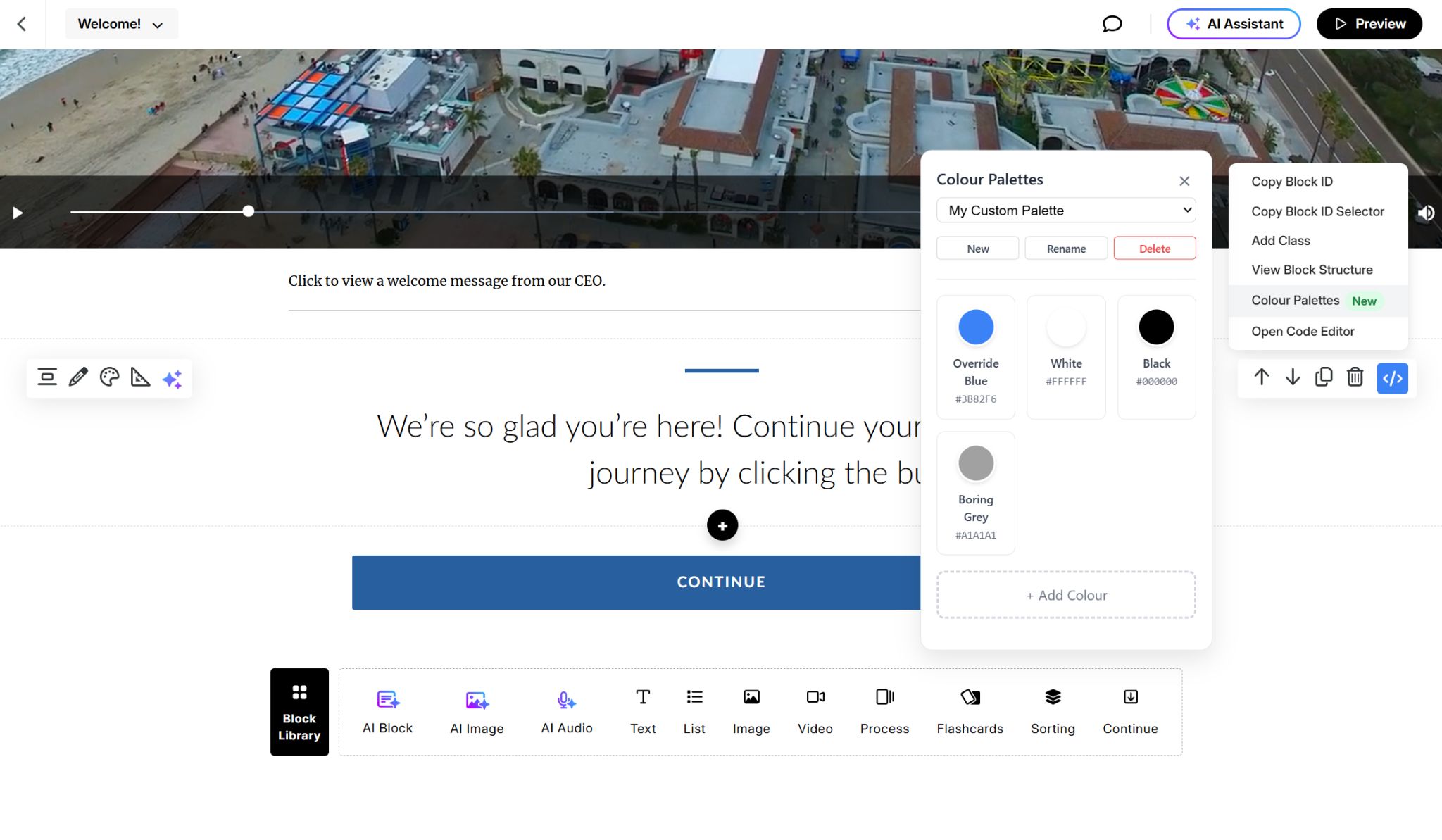
How It Works
The new Colour Palettes feature is refreshingly simple:
1. Create Your Palettes
Open RiseOverride and click "Colour Palettes" to create named colour palettes. You might create palettes like "Acme Corp Brand Colours," "Healthcare Client," or "My Go-To Colours."
2. Add and Name Your Colours
Add colours to each palette using the colour picker or by pasting hex codes. Give each colour a meaningful name like "Primary Blue," "Call-to-Action Orange," or "Section Background."
3. Use Them Instantly
When you're customizing a Rise course, your saved colours appear right in the colour picker. Click to use them immediately—no copying and pasting hex codes.
Perfect for Professional Course Creators
This feature is especially valuable if you:
Work with Multiple Clients
Keep each client's brand colours organized in their own palette. Switch between client projects without losing track of their specific colour requirements.
Build Course Series
Maintain perfect colour consistency across multiple lessons, modules, or courses. Set up your colours once and use them throughout the entire training program.
Follow Brand Guidelines
Input your organization's official brand colours once and always have them available. No more "close enough" colour choices that don't quite match the style guide.
Share with Your Team
Export your colour palettes and share them with colleagues. Everyone can use the same exact colours, ensuring consistency across team-created content.
Getting Started is Simple
Ready to organize your colors? Here's all you need to do:
- Update RiseOverride: The update happens automatically through the Chrome Web Store
- Open the extension: Click the RiseOverride icon in your browser
- Find "Colour Palettes": It's the new option in your popup menu
- Start organizing: Create your first palette and add your most-used colours
Real-World Example
Let's say you're creating training for a healthcare company. You can create a "MedCorp Training" palette with:
- "Corporate Blue" - #2E5C8F (their primary brand color)
- "Trust Green" - #4A7C59 (for positive messaging)
- "Alert Red" - #C53030 (for important warnings)
- "Neutral Gray" - #718096 (for supporting text)
Now, every time you work on their training materials, these exact colours are ready to use with one click. No more digging through old emails for hex codes or wondering if you're using the right shade of blue.
Ready to Save Time on Your Next Project? The Colour Palettes feature in RiseOverride v1.6.3 is designed to make your workflow smoother and your courses more consistent. Whether you're working with one client or dozens, having organized, easily accessible colours will save you time and help you deliver more professional results. Best of all, it's completely free and available right now.
Install RiseOverride for free and start organizing your colours today.